
The Power of Review Schema:
⭐How to Make Your Google Reviews Show Up in Search Results
If your business has a steady stream of glowing Google reviews, you’re already doing something right — but what if those reviews could do more than just sit on your Google Business Profile?
What if they could appear right under your website link in Google Search results, grabbing attention before anyone even clicks?
That’s exactly what Review Schema can do — and it’s one of the most overlooked, yet powerful, SEO tools available today.
Posted by: Trish McLachlan
June 25, 2025
💡 What Is Review Schema?
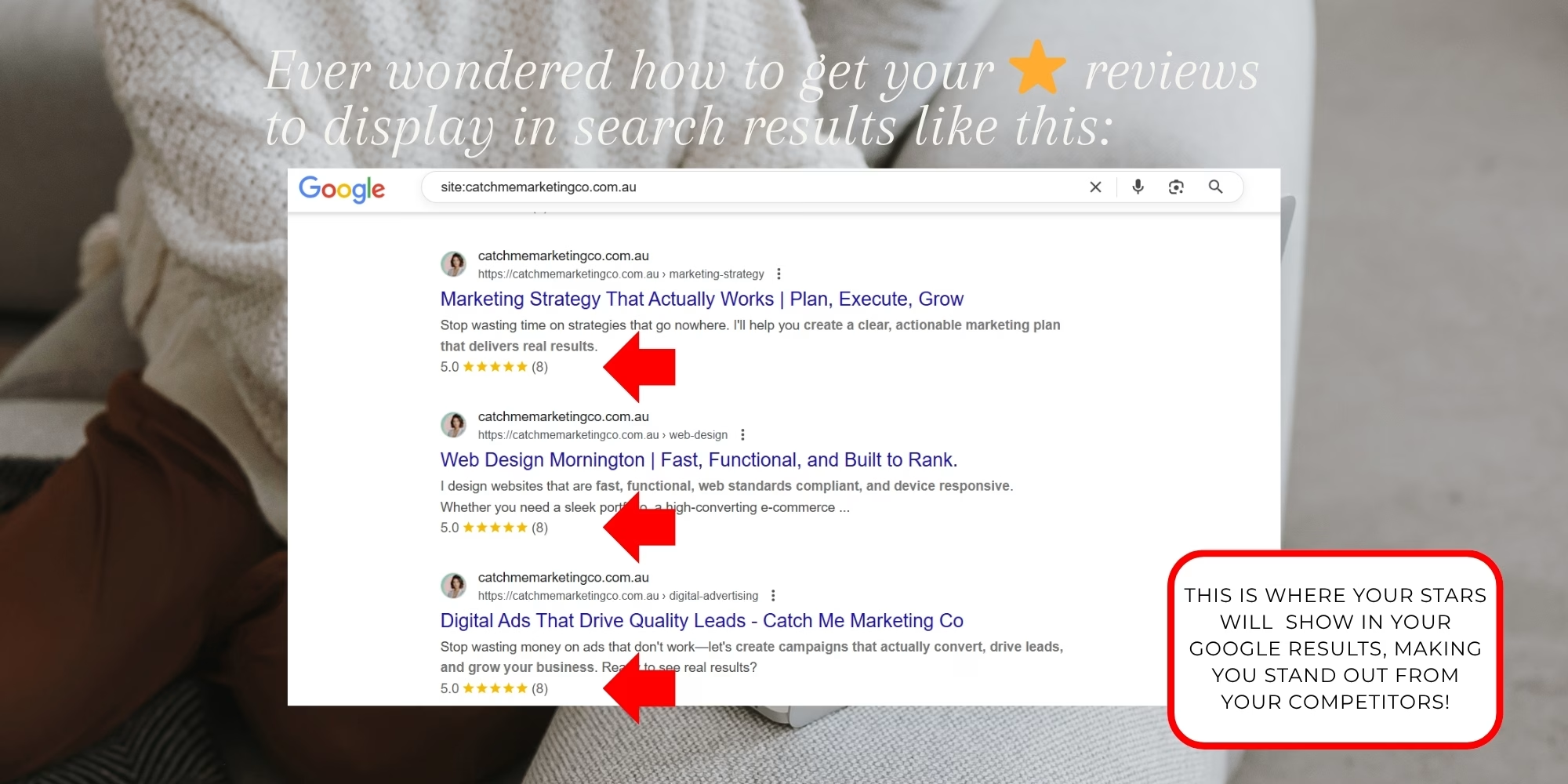
Review Schema is a special type of code (called structured data) that you can add to your website. It tells Google and other search engines to display your star rating and total number of reviews directly in your search result listing — also known as a rich snippet.
It looks like this in search results☝️
🚀 Why Review Schema Matters
Adding Review Schema to your website helps your business stand out in search results with eye-catching star ratings, build instant credibility with potential customers, increase click-through rates, and provide AI-powered search engines with the clear, structured data they rely on to recommend trusted businesses.
Stand out in search results with star ratings
Schema adds visual impact to your listing — and visuals = traffic.
Build trust instantly with potential customers
Showing your rating before the click creates confidence before they even land on your site.
Increase click-through rates (CTR) to your site
More clicks mean more traffic — without spending more on ads.
Feed AI-powered search tools with structured, trustworthy data
Structured data helps Google and AI tools understand and recommend your business.
🔧 How to Add Review Schema to Your Website
There are a few ways to implement Review Schema — and yes, you can even DIY it.
Here’s a simplified step-by-step:
1. Choose the Right Schema Type
For most local service businesses, use:@type: LocalBusiness or @type: Service
2. Create the Schema Code
Here’s a sample using Service schema:@type: LocalBusiness or @type: Service
<script type=”application/ld+json”>
{
“@context”: “https://schema.org”,
“@type”: “Service”,
“name”: “Put the service you provide”,
“description”: “Put your description here. For example: Expert home, kitchen, and bathroom renovations across Melbourne.”,
“provider”: {
“@type”: “LocalBusiness”,
“name”: “Put the name of your business here”,
“image”: “https://yourdomainlinktoyour/logo.jpg”,
“url”: “https://yourdomain.com.au”,
“telephone”: “+61 3 9999 8888”,
“address”: {
“@type”: “PostalAddress”,
“streetAddress”: “your street address”,
“addressLocality”: “suburb”,
“addressRegion”: “VIC”,
“postalCode”: “3000”,
“addressCountry”: “AU”
}
},
“aggregateRating”: {
“@type”: “AggregateRating”,
“ratingValue”: “Put your aggregate value here. For example: 4.9”,
“reviewCount”: “Put the number of reviews you’ve received here. For example: 43”
}
}
</script>
3. Add It to Yor Website
Place the code in the <head> section of the page that you want to show your reviews.
4. Validate Your Code
Use Google’s Rich Results Test to make sure your schema is working.
5. Monitor in Google Search Console
Check for “Review Snippets” under the Enhancements tab in your Google Search Console once your page is indexed.

🧠 Pro Tip: Schema + AI Search = SEO Gold
With AI tools now summarising content, recommending businesses, and powering voice search — structured data is the language of machines. Adding Review Schema makes your website easier for AI to understand, trust, and promote.
Want to do it yourself?
We’ve created a free step-by-step DIY Review Schema Guide to walk you through the entire process — even if you’re not tech-savvy.

Stay in The Know
Join The Inner Circle 🤫
Get the latest industry news, juicy case studies, and bite-sized marketing tidbits delivered straight to your inbox. No spam, just the good stuff.
Sign up below and join the crew! 👇